
Congrid Live - Project Menu
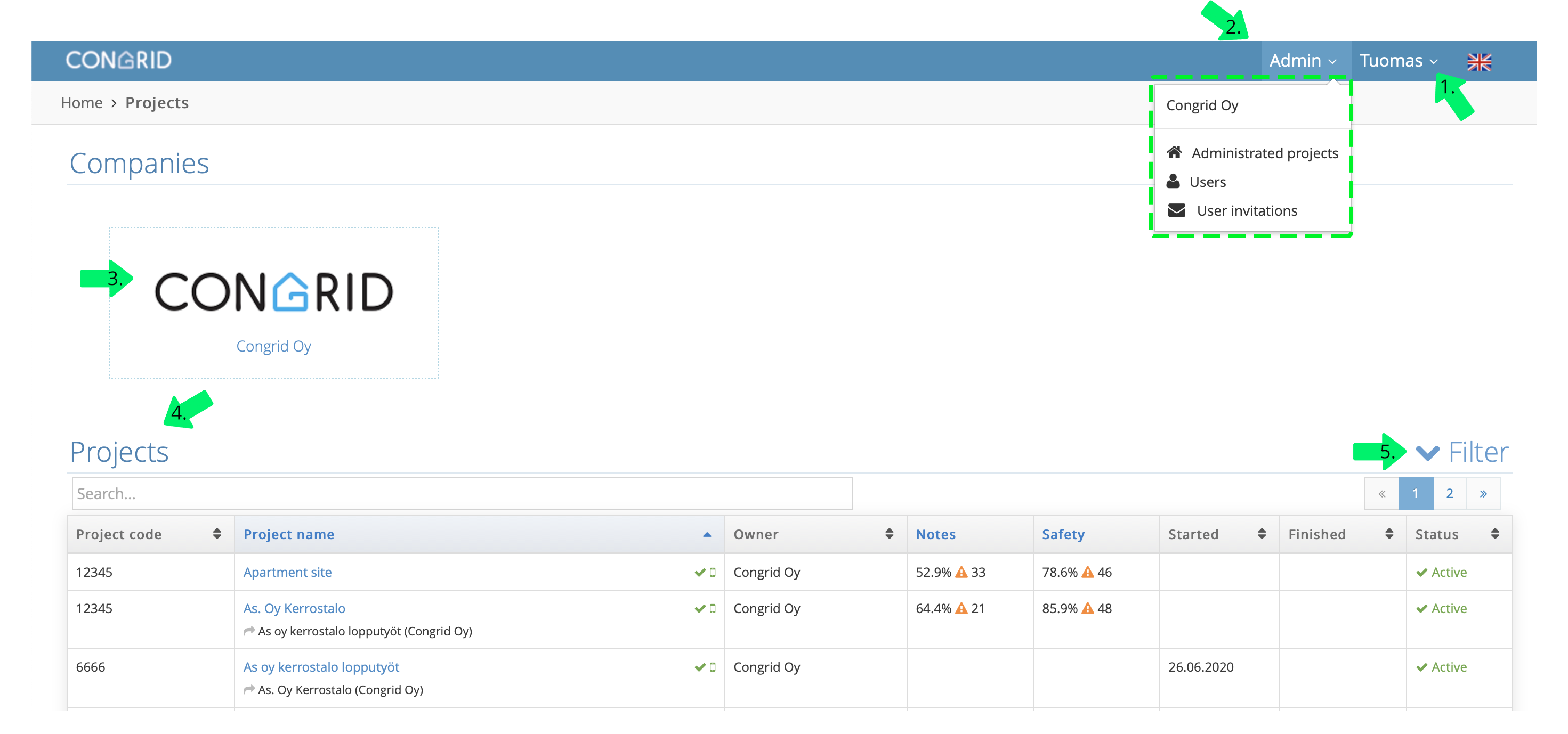
An administrator has a slightly different Project Menu than a project's main user has.
Your company may have more than one administrator.
1. User - Here you can change your password, open the knowledge base, edit your own account or log out.
2. Control Panel
- Administrated Projects - User with admin rights sees all company's projects and is able to edit them. See the guide: Administrated projects
-
Users - Edit company users and their rights. See guide: Editing user rights
-
User invites - Invite new users or inspect the status of invite activations. See the guide: Adding a new user account
3. Company analytics Inspect all projects' company-level analytics. See the guide: Company analytics
4. Projects - An administrator sees all projects that are attached to their account. The project appears in the Projects listing if an administrator has any user rights set to it.
5. Filtering - All the company projects can be filtered.
Comments
0 comments
Please sign in to leave a comment.