
Open the dropdown menu and choose Diary.

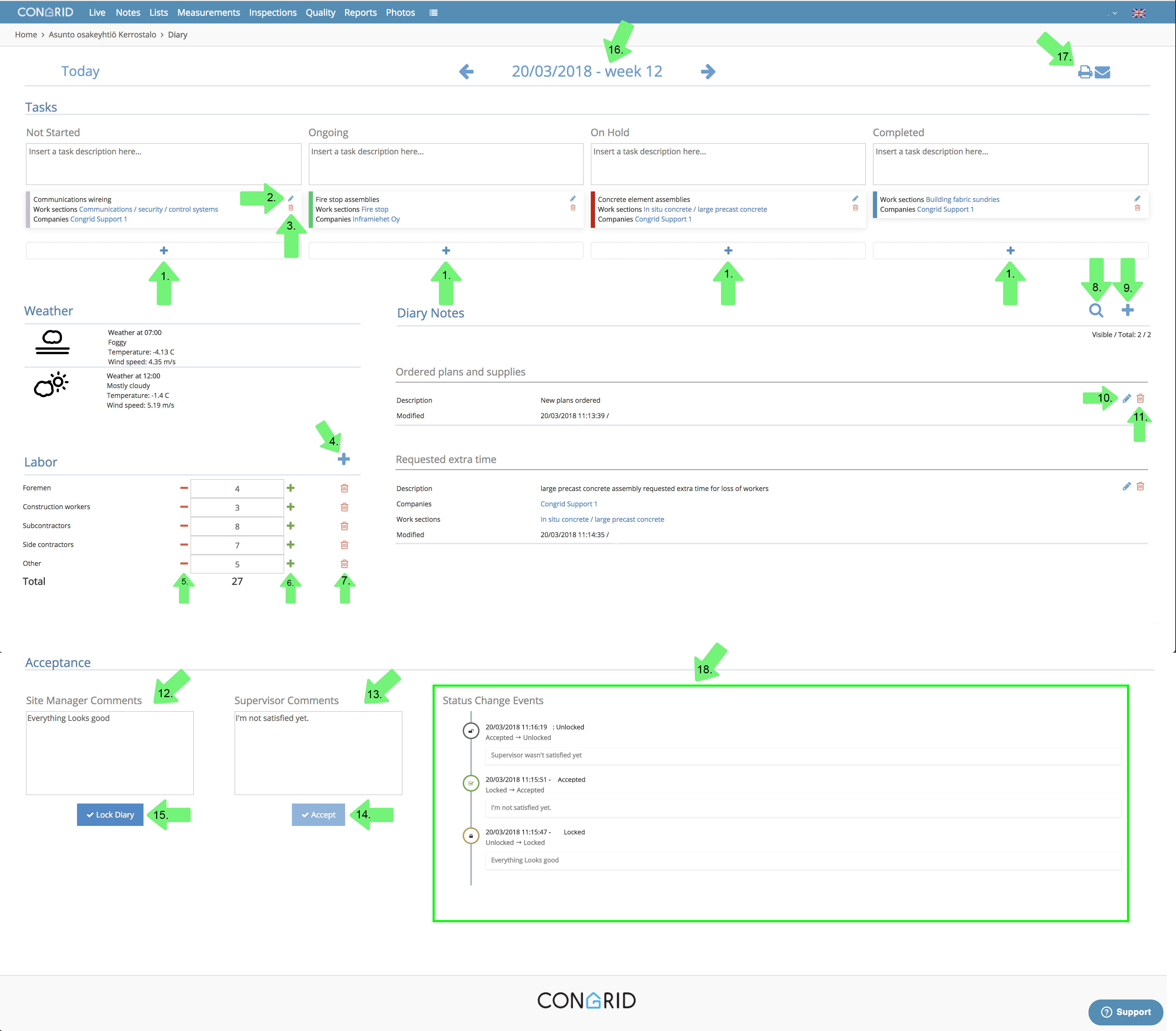
The following numbered descriptions display what you can do on the Diary tab.
1. Add work sections. Work section status can be some of the following:
Not started
Ongoing
On hold
Completed
You can drag and drop work sections to move them.
2. Edit a work section or topic.
3. Delete a work section.
4. Add a labor force field.
5. Delete persons from labor force.
6. Add persons to labor force.
7. Delete labor force field.
8. Search and filter notebook entries.
9. Add notebook entries.
10. Edit notebook entries.
11. Delete notebook entries.
12. Corresponding builder's additional notes.
13. Supervisor's additional notes.
14. Accept notebook. If a supervisor accepts notebook it can't be edited anymore. If you want to edit it or you have accidentally accepted it please contact support@congrid.com.
15. Locking a notebook. This action is not permanent.
16. Change date. All changes will save automatically.
17. Print notebook.
18. See changes that a supervisor or site manager has done.
Comments
0 comments
Please sign in to leave a comment.