
Congrid Live Service - Company settings
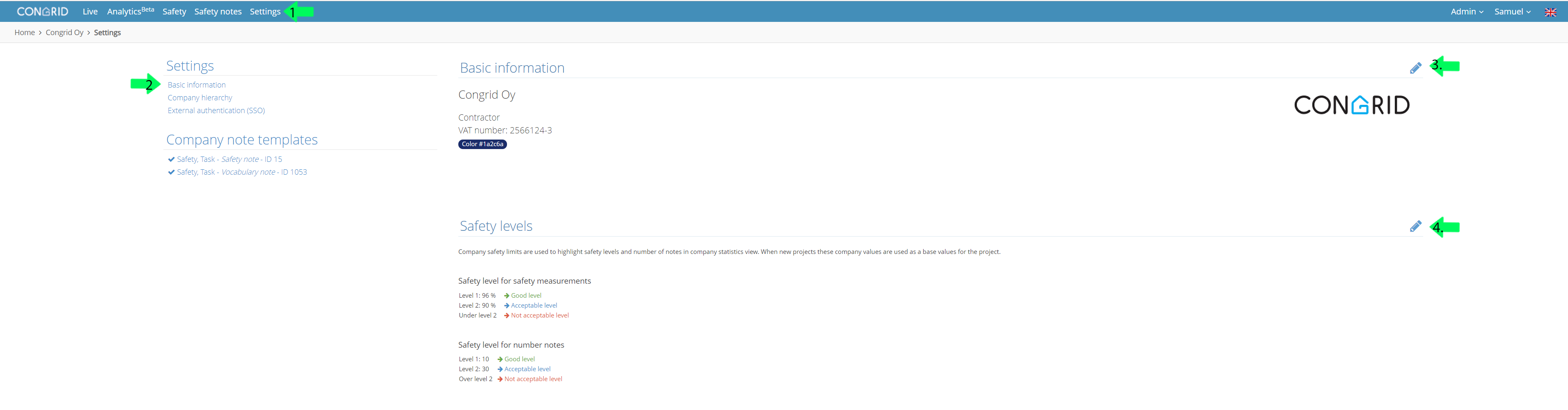
1. Open the "Admin" drop-down menu and click your company name.

Company Data
1. Click Settings.
2. In the setting page click "Basic Information".
3. You can edit the following information:
Name
Specifier
VAT number
Color of Notes
Changing company data transfers changes to all projects.
4. Define safety level targets. This data will only be transferred to new projects.
Company Structure
1. Choose Company Structure if you want to edit the company project hierarchy.
2. You can define level on the following criteria
- Concern
- Company
- Production Unit
- Foreman
- Personnel
- Worksite
You can also define names for hierarchy levels.
3. Edit or delete units. Use green plus icon (+) to add sub-units. This makes the hierarchy more specific.

This information does not upload automatically. You can define a company unit in the project settings. See the guide: Basic project data
External authentication
External authentication means logging in through your company's page. If your company has no external authentication activated your page will look like this. If you want to activate external authentication contact Congrid support: support@congrid.com

Company note templates
Manage your company's note templates. Templates visible on this page are activated automatically on to all company projects created. Note templates are also manageable on a project level.
1. Open template by clicking its name.
2. Press the pen icon to change its name.
3. Add a new field to the template.
4. Delete template.

Comments
0 comments
Please sign in to leave a comment.